Battery or Hardwired: Powering Smart Shades in Sheridan
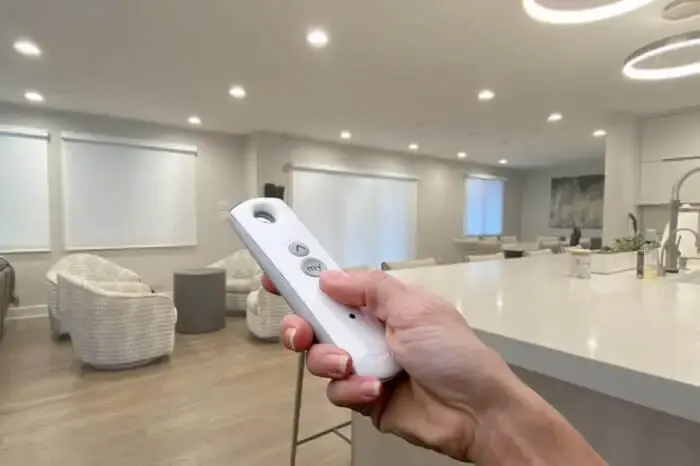
Motorized shades and smart shades get talked about like they're the same thing, and they are not quite. One is a shade with a motor in it. The other adds a layer on top that lets an app or a voice assistant reach that motor. Here is how the pieces actually fit together for a Sheridan home.
How Motorized Shades Actually Work
The gap in price between a basic motorized shade and a fully smart one is almost entirely the hub, not the motor itself. Most tube motors, whether battery or hardwired, cost about the same regardless of which brand's ecosystem they end up talking to. What changes the total is whether you add a bridge that gets it onto Wi-Fi and into an app.
Battery motors are usually the lower upfront cost, based on national pricing patterns, since there's no wiring labor involved, just a shade that gets mounted and a battery pack that gets charged. Hardwired motors typically run a bit more once you account for an electrician's time, but they never need charging, which some Sheridan homeowners weigh against the install cost.
One hub, in most systems, can control quite a few shades at once, so the smart layer's cost gets spread out fast if you're doing more than one or two windows.
Battery Life and Charging in the Real World
Bedrooms and living rooms with average use, opened in the morning and closed at night, are the easiest case for battery motors, since one or two cycles a day sips very little power. A home office shade adjusted constantly to manage glare on a screen is a different story and will need charging more often.
Large windows in a Sheridan great room or a sunroom, where a single shade might be five or six feet wide, draw noticeably more power per cycle than a narrow bedroom window, simply because the motor is moving more fabric and more weight.
For a room where the shade barely moves, maybe a formal dining room that only closes for parties, a battery can go a long stretch without attention, which makes battery power a perfectly reasonable choice there.
Power Planning and Backup Control
Ask, before ordering, whether power is actually available near each window getting a hardwired motor, or whether it needs to be added. That's a question for the measure appointment, not something to figure out on install day once tools are already out and a wall is already open.
Ask whether a physical remote or keypad is included, or whether it's an extra line item. Given how much day-to-day control ends up living in an app, having a backup that doesn't depend on Wi-Fi is worth confirming rather than assuming.
And ask how scenes are structured in a Sheridan home with multiple shades, which shades are grouped together and what still works if the hub itself loses power or connection. That last question tends to reveal how well a system was actually planned versus just installed.
Every home's Wi-Fi layout and window setup is a little different, which is exactly why a generic online configurator only gets you so far. A free in-home measure gives someone a chance to look at your actual router placement and wall layout before recommending a system.
Voice Control and the Hub Question
Alexa and Google Home are voice platforms, not the company that made your shades, and the same is true of Apple's Home platform. In almost every case, the shade motor talks to its own manufacturer's hub first, and that hub is what actually connects out to the voice platform through a skill or an integration.
Apple's system, Home, has historically been the strictest about this, generally wanting a hub built specifically for that ecosystem, or a compatible bridge, in the chain before a shade shows up as an accessory. Z-Wave and Zigbee are two other low-power standards some shade brands build into their motors directly, and each needs a hub that speaks that specific protocol.
A newer standard, Matter, is meant to smooth all of this out by letting devices work across ecosystems without as much brand-specific bridging. Some newer hubs support it, but plenty of shades already installed in Sheridan homes predate it and still rely on their original manufacturer hub.
What Actually Fails in a Smart Shade System
We get called out for the same handful of issues over and over. A shade that responds to the remote but not the app almost always means the hub lost its Wi-Fi connection, not that anything is actually broken. A shade that's gone completely silent, remote included, is much more likely a dead battery than a failed motor.
A hub that worked fine for months and then suddenly stops is very often tied to a router change or a password reset, either of which can knock a hub off the network until it's manually reconnected.
Actual motor failure does happen eventually, usually after years of heavy use in a Sheridan home where a particular shade gets cycled many times a day, but it's a small fraction of what we're actually called out for compared to network-side issues.
Frequently Asked Questions
Do I need a hub for every smart shade brand?
Almost always, yes, if you want app or voice control. The shade motor itself usually talks over a radio protocol that your home Wi-Fi cannot read directly, so a hub sits in between and translates. A handful of newer motors build networking in directly, but that is still the less common setup, so check for it specifically rather than assuming.
Will my smart shades still work if the internet goes down?
The physical remote usually will, since it talks straight to the motor over its own radio signal rather than through your home network. App control and voice commands will not, because both depend on the hub reaching the internet. That is why we suggest keeping at least one physical remote in the house as backup.
How long does a shade battery actually last?
It depends heavily on how often the shade moves and how big it is. A narrow bedroom shade cycled once or twice a day might go several months between charges. A wide living room shade cycled more often, or one in a cold room, will need charging more frequently. Manufacturer estimates usually assume light, average use.
 Do You Need Blackout, or Will Room Darkening Get the Job Done
 Inside Mount vs Outside Mount: Choosing the Right Fit for Your Sheridan Windows
 A Sheridan Homeowner's Guide to Custom Drapery for 2008